Attention, families approved for the extra curricular program. October 31, 2025, 11:59 pm EDT, the first deadline for submitting receipts is approaching fast.
You must have submitted receipts totaling at least 50% of your grant and include one activity. The extracurricular guide and submission guidelines are attached. Submissions that do not follow the guidelines will be declined, and you may not have the opportunity to resubmit before the deadline.
Families who miss this deadline will lose access to the program for the rest of the program year. They can apply for the next program year in early March 2026. Information about the upcoming program year will be available in March 2026.
Due to the program’s popularity, reviewing your application may take up to six to eight weeks.
All appeals for late submissions will be declined. Appeals for receipts submitted incorrectly will be declined.
The guide is thorough and will answer most questions.
If you have a concern about activities, please email elccsupport@metisnation.org to the attention of Emma, supervisor of the program. All concerns must be sent via email before October 21, 2025.
ELCC staff will not approve or accept receipts via email.
ELCC staff are unable to confirm the amounts left. Families are encouraged to keep records of their submission.
Receipts must be readable and not modified. The date paid must be on or after April 1, 2025.
Purchases for items purchased online MUST have the receipt generated after the item has shipped.
E transfer details must be the detailed summary and not the summary that appears in banking transactions.
Hockey Canada receipts MUST include the invoice and receipt (or proof of payment)
The Family Support team encourages submitting multiple receipts in one submission. Please note
Each child must be entered separately. For example, a receipt for an activity that is for two children must be entered twice, one for each child
In addition, receipts from different retailers, organizations, or dates must be entered separately.
Banking information changes can take up to four weeks to take effect.
Families are encouraged to download the MNO Education Hub app to receive up-to-date program information.
A confirmation email is generated and sent to the email listed under email address, in the Citizen Information section. Please check your spam and other folders for this email. ELCC staff will not confirm if your application was submitted.
Families must submit the remainder of their receipts by March 6, 2026, at 4:30 pm EST.
If you have already submitted receipts and submitted an activity, thank you!
Order Summaries/Confirmations and Receipt Requirements
The Early Learning and Child Care team cannot accept order summaries or confirmations created before an order is completed or shipped. A retailer provides these summaries or invoices to inform the customer of the order details, cost, and, in some cases, a tentative shipping date. Order summaries can be changed by the vendor and by the customer. Therefore, it does not demonstrate that the order was completed. This is an auditing requirement.
Below are some common online retailers that provide order summaries and how to obtain the required receipt. The team considers all documents titled pre-delivery/waiting for pickup/in-progress emails to be order summaries/confirmations, even if the online retailer labels them differently. Please note that these are examples of receipts only and may not represent items reimbursable through the program.
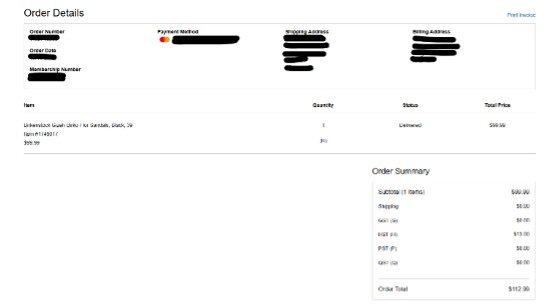
The example below is not accepted as proof of payment, even if the item is marked as delivered. We require the full invoice, including a tax (and tariff) breakdown. This is provided only after the item has shipped.
To get the required invoice, log in to your Amazon account and click “Returns & Orders.”
In your orders, find the item you purchased and click “Invoice”. This will create a drop-down. Select “Invoice”.
Example of an Amazon invoice
This will generate a full invoice, which we require to process the item’s reimbursement.
SportChek sends two emails when you order from the online store. The first receipt confirms the order has been received, and the second receipt states the order has been shipped and that the digital receipt is enclosed. We require the second email once the item has been shipped, along with the full receipt, even if some items are not being claimed. The receipt clearly shows that the transaction is complete.
Example of a SportChek order received
Example of a SportChek order shipped with an official receipt enclosed
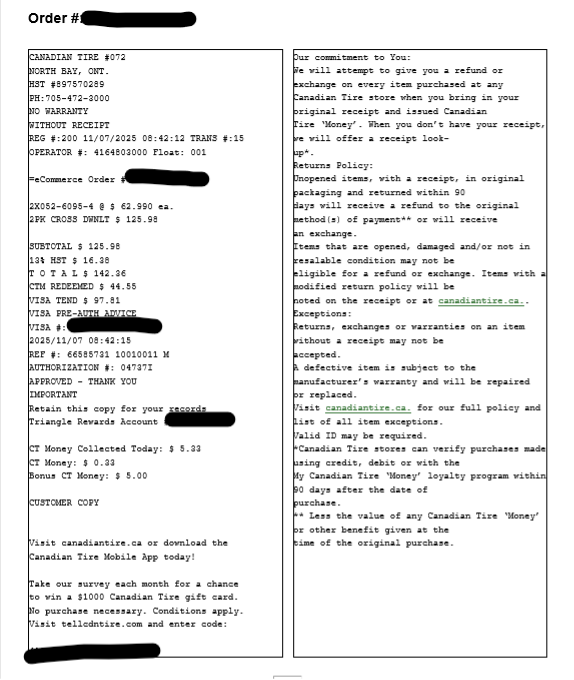
Canadian Tire sends three emails when you purchase from its online store. The first states that your order has been received; the second states that your item is ready for pickup; and the official receipt is issued once the item has been picked up. We require the official receipt once the item has been picked up (or delivered).
Example of a Canadian Tire order confirmation
Example of a Canadian Tire ready for pick-up email
Costco will send you three emails. The first states that your order has been received; the second states that your item has been shipped; and the official receipt is issued once the item has been delivered. We will require either the delivery email or your Costco profile login to print the order details.
Example of a Costco order confirmation
Example of a Costco order shipped
Example of a Costco order delivered or online order details
Walmart will send you three emails. The first states that your order has been received; the second states that your item has been shipped; and the third states that it has been delivered. We will require the email titled “Order Shipped”, as this is your official receipt. You can also log in to your Walmart profile to retrieve your receipt.
Some online retailers use 3rd-party payment providers such as Square, Shopify, PayPal, Stripe, or the Shop App. Often, the online retailer sends an order summary by email to confirm the purchase; however, the actual receipt or invoice is available through the 3rd-party payment provider or in your online retailer account.
In these cases, the order confirmation and the 3rd-party payment statement indicate that the order has shipped or been received. We are unable to provide support or troubleshooting for all online retailers that use 3rd-party systems, so we suggest contacting their customer service, which is usually available on their website.
The MNO supports Métis families with young children through the Extra-Curricular Reimbursement Program by having their child or children’s extra-curricular fees and/or extra-curricular equipment covered by the MNO.
Registered Early Learning science, technology, engineering and math (STEM) Programs
Registered Early Learning Arts (music, visual arts, dance, drama) Community Programs including Scouting and Girl Guides
Families can apply to have their child(ren)’s extra-curricular fees reimbursed by the MNO. The Extra-Curricular Reimbursement Program will not pay for extra-curricular fees in advance. Parents must pay all fees upfront and provide proof of purchase for reimbursement from the MNO.
The 2025-26 Extra-Curricular Program guide is now available here.
Eligibility Criteria
One parent or child must be a citizen of the Métis Nation of Ontario
The child or children must be between the ages of 0 and 12
The family must reside permanently in Ontario
The family must be able to provide proof of purchase of extra-curricular fees and/or extra-curricular equipment to partake in an extra-curricular activity (receipts are required)
CONTACT: For additional information or if you need help with the reimbursement process please contact ELCC Program Support by email at ELCCsupport@metisnation.org with any questions or concerns.